A diary inside your habit tracker: one paper page for every day
Your habits show what you did. The diary is where you write how the day went. Each page already has the date and that day's habits on it, plus a question so you never start from a blank page. Write one line or fill the page, by typing or by hand.

Free to download · iOS 17+ · No account required
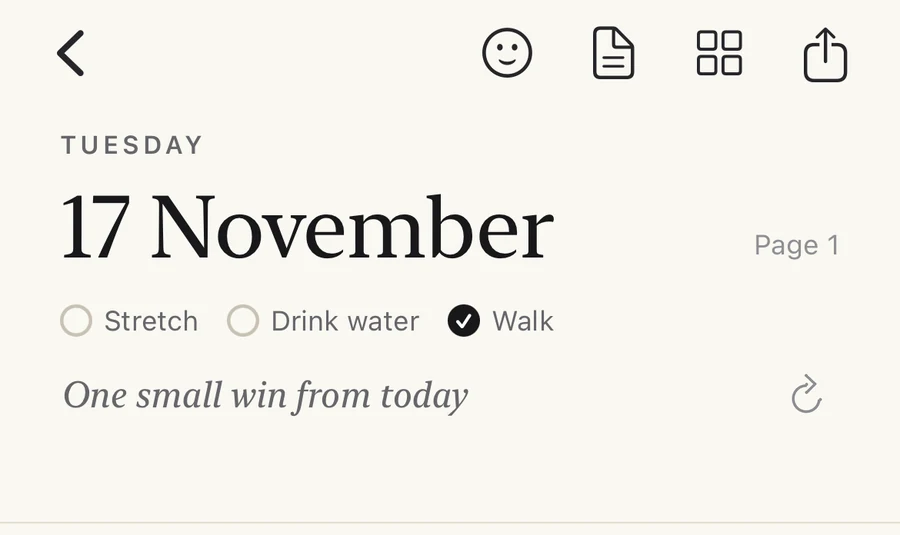
What's on a diary page
Open the diary and you get today's page: the date at the top, your habits for that day with their checkmarks, and a question to get you started, such as:
- What made today easier?
- One small win from today
- How did your habits feel today?
If the question doesn't fit your day, tap ↻ for another. There are eight in all, including “What drained you, and what helped?”, “Who made you smile today?” and “What will you do differently tomorrow?” All eight, with an example answer for each, are in end-of-day reflection questions. Below the question is the page itself, ready for a line or a whole entry.
Opening it
Tap + and choose Diary. After 6 pm, once every habit due today is done or skipped, a “How was today?” card appears on the home screen until you write the day's page, so a line in the diary becomes the last step of the day's check-ins.
Type, or write by hand
Type on the lines, or pick the pencil, pen or highlighter and write or draw on the same page. There are a few colors plus your own custom colors, an eraser, and undo for everything. Typed text can be serif, sans or a handwriting style.
Stickers
There are 48 hand-drawn stickers for weather, mood, food, nature, habits and frames, with or without color. Tap a sticker, or your own handwriting, to move, turn, resize or delete it. A sun and a tired face can say a lot on a day you don't feel like writing.
Paper that matches your app
Choose lined, dotted, grid or plain paper. The page follows your app theme: warm paper by default, lavender on Serene, dark on Mono Black.
Going back
Swipe across the date to go back a day, or tap the date to open a calendar. All your pages also appear in a grid, where you can open or delete them.
Private by default
Everything saves by itself and stays on your phone; it is included in your iPhone's regular backup, with no separate account or sync. If you want to share a page, export it as an image.
Not for you?
Hide it in Settings › Appearance › Show Diary in + menu. Your habits work exactly as before.
Why keep a diary next to your habits
A checkmark records that you did something. A line in the diary records why it was easy or hard. After a few weeks, the lines explain the pattern in the checkmarks: the walk you skipped three Tuesdays in a row, each time after a late meeting, or the reading habit that only happens when your phone is charging in another room. That is the kind of detail that tells you what to change, and it is hard to remember a week later.
Because the habits are already on the page, you don't need to write them out. One honest sentence is enough. If you want help making it a daily habit, read how to make journaling a habit.
Ways to use it
One line at night
Answer the question on the page in one sentence after your last habit. On busy days that is the whole entry, and it still counts.
Notes on missed days
When a habit stays unchecked, write what got in the way. Read those notes back and the fix is usually obvious: a different time, a smaller minimum, a better cue.
An evening review
What went well, where did I fall short, what will I do differently tomorrow? The Stoic evening review fits on one page.
Draw instead of write
Sketch, doodle or add a few stickers for the weather and your mood. A page doesn't need words to bring the day back when you look at it later.
The diary sits alongside the rest of the habit tracker: streaks and history for each habit, measurable goals, and Habit Duo for one shared habit with a friend.
Further reading
- How to make journaling a habit: start with one line a day, and what to do after a missed day.
- 8 end-of-day reflection questions: the diary's questions, with an example answer for each and when to use it.
- 8 Stoic habits: including the evening review that Seneca kept every night.
- Build an evening routine: where a short diary entry fits.
- Year in pixels: one colored square a day, if you'd rather keep a record on paper.
- How to track habits on iPhone: how a habit tracker compares with Apple's Journal app and Reminders.
Diary questions
Yes. The diary is part of Productify's free plan, alongside up to 5 habits. No account is required. See what's in Free and Pro.
Yes. The Diary gives you one paper page for every day, inside the app. Each page shows the date, that day's habits with their checkmarks, and a question to get you started.
Yes. You can type on the lines, or pick the pencil, pen or highlighter and write or draw on the same page, in a few preset colors or your own. There is an eraser, and undo works for everything.
On your iPhone. Pages save by themselves as you write and are included in your iPhone's regular iCloud or computer backup; there is no separate sync. If you want to share a page, you can export it as an image.
Swipe across the date to go back a day, or tap the date to open a calendar. All your pages also appear in a grid, where you can open or delete them.
Yes. Go to Settings › Appearance and switch off Show Diary in + menu.
Check off your habits, then write one line.
The diary is free. Download Productify and open today's page from the + menu; your habits are already on it.