
How to Use a Habit Tracker: A Complete Beginner's Guide
Choose an action, decide when it is due, and record what you actually did. This guide walks through a first week with a paper habit tracker or Productify, including days off, missed sessions, and a useful weekly review.
What a habit tracker actually does
A habit tracker records a repeated action against the schedule you choose. It can be a paper grid, a spreadsheet, or an app. A check-off habit records whether you did it; a measurable habit records an amount, such as minutes read.
The record helps you notice which plans fit your week and which need adjusting. You still need to practice the action, and a long streak alone does not tell you that a habit is automatic.
Choose paper or a habit tracker app
Start with where you want to see the record. Paper works well on a desk or inside a notebook. An app can keep the record on your phone and add reminders.
- For paper: download a free printable habit tracker. Choose a weekly sheet for a short experiment or a monthly grid for a longer view. Our free habit tools also include a 30-day tracker, a year in pixels sheet and a streak calculator.
- For iPhone: Productify supports reminders, measurable targets, and completion history. The free plan includes up to 5 habits and 5 starter templates, with no account required. To compare it with Reminders, Health and Journal, read how to track habits on iPhone.
- For other devices or workflows: compare the platforms and features in our habit tracker apps guide.
Use one record for the habit while you try the setup, so your check-ins are easy to find.
Decide what to track (and what not to)
Choose a repeatable action with a reason that matters to you. Reading, practicing a skill, preparing for tomorrow, and reviewing the week are all possible starting points.
Keep the first experiment small. Try one habit if you are unsure where to start. You can add another when the action and the check-in fit your routine.
A useful habit entry has three parts:
- Action: what you will do, such as read a book.
- Target: what counts as done, such as 10 minutes of reading.
- Schedule: when it is due, such as after dinner on weekdays.
Put a one-time errand on a to-do list. Turn a vague goal such as “learn more” into a specific practice session. Browse 30 habit tracker ideas if you need options.
Set up your first habit
Use reading as an example. Write “Read for 10 minutes after dinner, Monday to Friday.” The amount and schedule are examples, not rules; choose a target that works on an ordinary busy day.
- On paper: write the action and target in one row. Mark Saturday and Sunday with a dash because they are not planned reading days.
- In Productify: create a reading habit, choose a time target and the intended days, and set a reminder when you can act. You can also adapt a starter template.
- Decide how you will log. Tick a completed session, or record the time you actually read. If you only read part of the target, record that amount honestly.
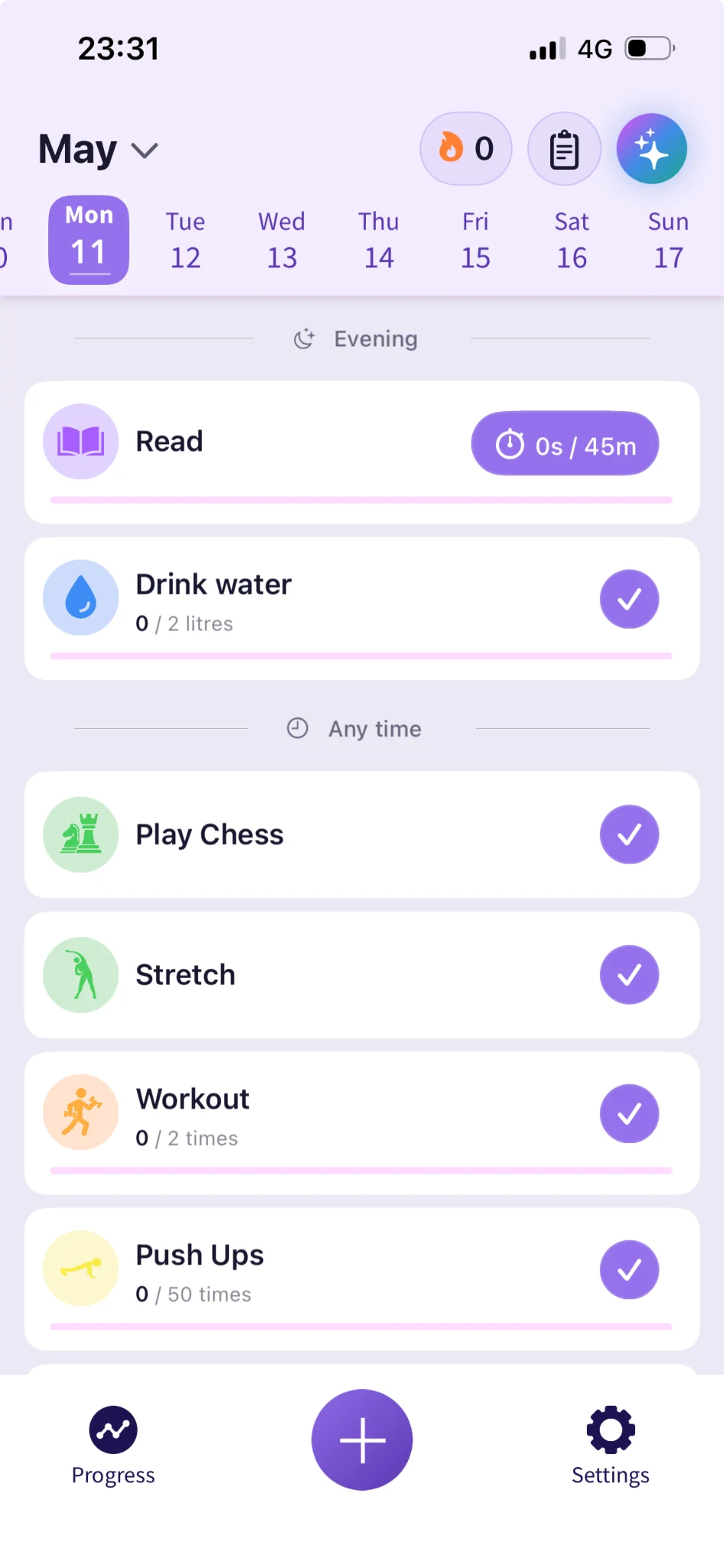
For a weekly habit, choose its actual frequency. “Review my week on Sunday” needs one session. “Practice three times a week” needs three; it does not need a daily tick.
Make the check-in easy to remember
Record the action just after doing it, or attach your check-in to a reliable moment in your day. For the reading example, you could mark the sheet when you close the book.
If you use a reminder, choose a time when you can respond. Repeatedly dismissing it is a reason to adjust the timing or target. There is no fixed number of days after which checking in becomes automatic.
If you miss the action, leave it missed and return at the next planned opportunity. If you did it but forgot to log, correct the record only when you know what happened. A note is better than an invented tick.
A first-week example with missed days
The example below shows three possible schedules together. You can start with only the reading row.
| Habit and schedule | Mon | Tue | Wed | Thu | Fri | Sat | Sun |
|---|---|---|---|---|---|---|---|
| Read 10 minutes Weekdays | ✓ | ✓ | ✓ | ✓ | — | — | |
| Practice a skill Tuesday, Thursday, Saturday | — | ✓ | — | — | ✓ | — | |
| Review the week Sunday | — | — | — | — | — | — | ✓ |
Reading was completed on 4 of its 5 planned days; practice on 2 of 3. Days off do not count as misses. In this example, the blank cells are known missed sessions. If you simply forgot to log, leave a note rather than guessing what happened.
For reading, four completed sessions divided by five planned sessions is 80%. Comparing against seven days would wrongly count the weekend as failure. A weekly review completed on Sunday meets its once-a-week schedule.
Print your own weekly tracker with a Monday or Sunday start and use the same key. Decide the schedule before the week starts so the record stays meaningful.
Review the week and choose one change
Use the first review to learn about your setup. A high completion rate is encouraging, but it is not proof that a habit has become automatic. See what habit-formation timelines mean.
- Count the planned attempts. Separate completed sessions, missed sessions, and days off. Keep unknown entries visible.
- Notice what got in the way. Was the reminder inconvenient, the session too long, or the plan difficult on a particular day?
- Change one thing. Try an earlier reminder, a smaller target, or different days for the next week.
- Keep what fits. You do not need to increase a target just because you met it.
In the worked example, Thursday's practice was missed. Moving it to a less busy time is one change to test. Productify's optional AI Habit Analyser on Pro offers another way to reflect on your data, but you can do this review yourself.
Common mistakes to avoid
- Adding more than you can practice. Reduce the list if it repeatedly feels unmanageable.
- Counting days off as misses. Judge the habit against the schedule you chose.
- Marking a target complete before doing it. Record actual progress, including partial amounts.
- Changing everything at once. One adjustment makes the next week's record easier to interpret.
- Treating the streak as the whole result. Keep your history and use it to decide what to try next.
Frequently asked questions
Start with one or two if you are learning what fits your day. There is no universal ideal count. Add another when practicing and recording your existing habits feels manageable.
Record the habit after doing it, or choose a reliable check-in moment such as the end of your workday. Use a reminder if it helps, and change the time when it repeatedly conflicts with your schedule.
If you know you completed the action, record it accurately using the options your tracker provides. If you do not remember, leave a note instead of inventing a completion. Keep a missed session separate from a day that was never scheduled.
Both can hold a useful record. Paper is convenient when you want the tracker on your desk or in a notebook; an app adds reminders and progress views. Try the format you can use and review regularly. Download our free printable trackers if you prefer paper.
Yes. Write down the days or weekly frequency in advance. A Sunday review is one planned session, not seven. Judge completion against that schedule and mark days off separately.
Productify offers habit tracking on iPhone with reminders, measurable goals, history, and optional Apple Health integration for compatible activities. You can start without an account and track up to 5 habits free, with 5 starter templates. Compare it with the devices and features you need before choosing.
Related reading
- Free printable monthly and weekly habit trackers
- Download Productify free and set up your first habit
- What habits should I track? 30 daily habits worth building
- Habit tracker vs to-do list: which do you actually need?
- Productify habit tracker: full feature overview
- Habit templates, 50+ ready-made daily habits
- 6 best habit tracker apps in 2026: compared