
A habit tracking app for
daily and weekly routines
Productify helps you put each habit on a schedule, set a reminder, and record what you actually did. Track a simple check-off, time spent, or a measurable goal in one daily list. Start free on iPhone with up to 5 habits and no account to create.
Free for up to 5 habits · No account required · iPhone & Apple Watch
What does a habit tracking app do?
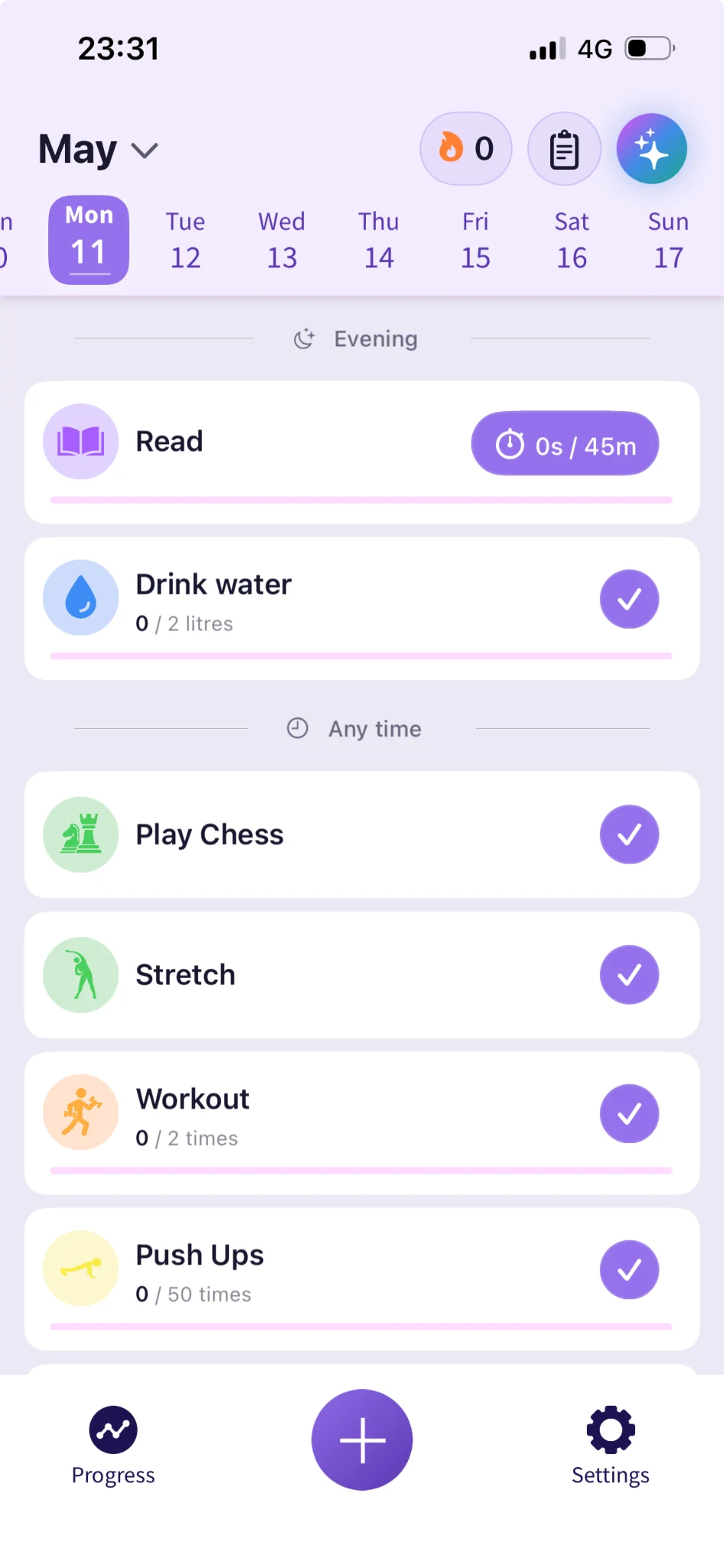
A habit tracking app records a repeated action against the schedule you choose. Instead of trying to remember whether you practiced this week, you have a record to review. Reminders cue the action; your check-ins show what happened.
Productify supports habits you check off and measurable goals such as minutes, pages, or repetitions. Compatible activities can use optional Apple Health integration; other habits are recorded manually.
A one-time errand belongs on a to-do list. A recurring reading session belongs in a habit tracker. Our tracker versus to-do list guide explains how to choose.
How to track a habit in Productify
- Name an action. Create your own habit or choose from the habit templates. If you need inspiration, browse 30 habit tracker ideas.
- Choose the schedule and target. Decide when the habit is due and what counts as done. For reading, that could be 10 minutes after dinner on weekdays.
- Set a reminder. Choose a time when you can act. Adjust it if the reminder repeatedly arrives at an inconvenient moment.
- Log the result. Check off the action or enter the quantity you completed. Record partial progress honestly instead of treating the target as already finished.
- Review the week. Look for missed scheduled days and adjust the time, goal, or frequency. A smaller repeatable action may fit better than your first plan.
After a missed day: the current streak count resets, while your recorded history stays intact. Resume on the next scheduled day and use the record to adjust the routine. Read more about streaks and completion history.
Examples of daily and weekly goals
| Habit | Schedule | Record |
|---|---|---|
| Read | Weekday evenings | Minutes read toward your target |
| Practice a skill | Three chosen days each week | Minutes of practice |
| Prepare for tomorrow | At the end of each workday | Check off after writing the first task |
| Review the week | Sunday afternoon | Check off after reviewing your record |
For a more detailed first-week plan, follow the beginner's habit tracking guide.
Habit tracking features and free-plan limits
Free: a small routine with reminders and history
Track up to 5 habits with per-habit reminders, streaks, and completion history. Start with 5 included templates or create a habit yourself. The free plan has no trial deadline and does not require a Productify account.
Pro: more habits and optional support
Pro adds unlimited habits, the full template library, advanced analytics, Habit Duo for tracking a habit with one friend, and AI Habit Analyser for reflecting on your data. Check current Free and Pro options for plan details.
Check in from iPhone or Apple Watch
Productify includes an Apple Watch companion, Home Screen widgets, and Live Activities. Its workflow is built around Apple devices; there is currently no Android or browser version.
Your habits stay on your device by default. Optional sharing and AI features involve additional data processing; see the privacy policy for those details.
Is Productify the right habit tracker for you?
Consider Productify if you want to log a routine on iPhone, use measurable goals, and start without creating an account. If you need Android, a web app, automatic activity detection, or a full to-do manager, compare those requirements before choosing.
Our best habit tracker apps guide covers six options by platform and tracking style. For specific tradeoffs, read Productify as a Habitica alternative or Productify vs Habitify.
Comparing similarly named apps? Productify vs Productive explains how they differ. If you are moving from Android to iPhone, see our comparison for Loop users.
Prefer paper? A notebook or one of our free printable habit trackers can record the same planned actions. Choose the format you can use and review consistently; an app mainly adds convenient reminders and progress views.
Habit tracker: frequently asked questions
All Productify habit tracker features
Explore the features that fit your routine, from measurable goals to a habit shared with one friend.
Streak Tracking
Guilt-free momentum tracking that keeps history intact when life interrupts your routine.
Learn more →Habit Duo
Track one habit with one friend and see your progress together. Available on Pro.
Learn more →AI Habit Analyser
Review patterns in the habit data you choose to analyze. Available on Pro.
Learn more →Habit Templates
Choose from 5 free starter templates or explore the full library on Pro.
Learn more →Measurable Goals
Attach real numbers to your habits: steps, minutes, reps, glasses. Know exactly when you're done.
Learn more →Start your daily habit tracker today.
Choose one habit, set its schedule, and record your next check-in. Start free with up to 5 habits and 5 starter templates, with no account required.